Appearance
Authentication & Authorization
A core goal of the platform is to reduce the authentication and authorization effort for the individual application as much as possible. In addition, it is recognized that the requirements regarding authentication and authorization vary greatly between different applications.
The platform supports the following authentication use-cases:
- SSO/OAuth login for internal users
- SSO/OAuth login for users of different organizations
- Anonymous/Public Access
- Accounts with username/password authentication
- Service Principals for
- access from external systems
- user authentication via browser
Retrieving information about the authenticated principal
The platform provides the api/gw/platform/principal endpoint, which returns information about the authenticated principal. For example:
json
{
  "principalId": {
    "type": "ACCOUNT",
    "id": "59"
  },
  "displayName": "Account John Smith",
  "accountId": 59,
  "personName": "John Smith",
  "email": "john.smith@acme.com"
}
It can be used from the fronten or the backend.
Using service principals for access application backends from external systems
Create a service principal and a header-token. Add the service principal as user of an application. Then you can create a request as follows:
bash
curl https://my-app.app-platform.cudos.ch/api/my-endpoint -H "Authorization: Bearer SP:385:35e..."Note that the service principal has access to all endpoints of the application. Make sure to use appropriate authorization checks in your backend.
Using service principals to access an API from external systems
Create a service principal and a header-token. Add the service principal as user of an API and enable external access under permissions. Then you can create a request as follows:
bash
curl https://app-platform.cudos.ch/api/gw/my-api -H "Authorization: Bearer SP:385:35e..."Using service principals to access an application
Sometimes it is useful to be able to just send a link to a third party and have the receiver beeing able to use an application. This can be achieved by creating a service principal and a 'query token`. Add the service principal as user for the application.
Then copy an URL from your application and append the ?$auth=SP:58:92f... query parameter to it. For example, https://my-app.app-platform.acme.com/ becomes https://my-app.app-platform.acme.com/?$auth=SP:58:92f.... Using this link, an authentication cookie will be set which will allow the user to access all pages from your application.
Token Brokering for External APIs
Certain APIs like Google and Microsoft can be integrated into your application directly using client libraries. This makes development more straightforward, but it means requests cannot be routed through the App Platform gateway. Instead, the gateway acts as a token broker. The token endpoint at https://app-platform.cudos.ch/api/gw/platform/token can be used to obtain Tokens for external APIs.
App-Platform Configuration
To set up token brokering, you first need to add a token source to your application on the app-platform.
- Navigate to the
Permissionstab in your application and scroll down all the way to the bottom. You should see aToken Sourcessection:

- Enter a name for your token source, for example
googleand click Add. Now expand the created token source and add the organization OAuth provider of your choosing, in this example it isCudos - Google:
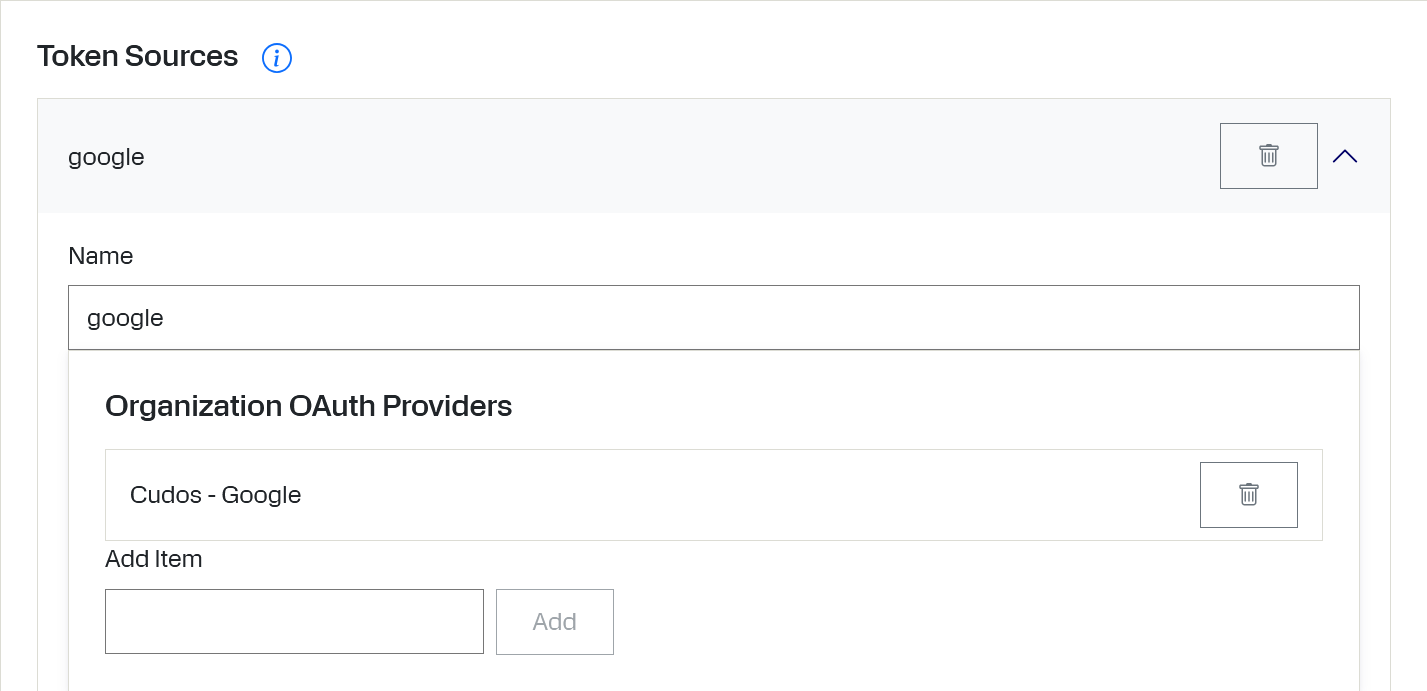
Your application now has a token source.
Obtaining a Token
Once the token source is configured, tokens can be obtained via the https://app-platform.cudos.ch/api/gw/platform/token endpoint. You will need to provide two parameters:
The name of the token source, in our example this is
google.The desired scope(s). We will use
https://www.googleapis.com/auth/calendar.eventsfor the example. If you need multiple scopes, combine them into a single space-separated list before requesting the token, for example:https://www.googleapis.com/auth/gmail.readonly https://www.googleapis.com/auth/gmail.send.
Use util methods provided in the templates to call the token endpoint instead of constructing the URL manually. The express backend has a TokenService class that handles this, whereas you can use buildQueryString and fetchWithAuth() in the react frontend.
Handling the App Platform Response
If the user is not authenticated with the external API, the gateway responds with a 403 that contains a login redirect in its location header.
Backends must forward these errors, including the location header. The template contains middleware that does this, you just have to set up routing correctly so that the error handlers catch the errors. For more information visit https://expressjs.com/en/5x/guide/error-handling/.
The frontend should handle the error by navigating to the redirect adress. The template's fetchWithAuth() method does this automatically, so make sure to use it.